Claude in a Box: Trying Computer-Use on My Laptop

Most software I automate is designed for it. Developer tools -- git, Docker, kubectl, Terraform, the cloud consoles, Postgres, GitHub -- all ship CLIs, APIs, or MCP servers that are fast and scriptable. Chrome DevTools MCP handles the browser. But plenty of apps have none of that, just a GUI and no automation story. Computer-use is for those. I finally spun up Anthropic's computer-use demo this week to try it.
The demo
Anthropic ships a Docker image with a full Linux desktop inside -- Firefox, LibreOffice, a file manager, a terminal. The agent loop talks to the Claude API and drives the screen. Four ways in: a Streamlit chat on 8501, a browser VNC on 6080, a combined chat + desktop page on 8080, and a native VNC connection on 5900. 8080 is the one you want.
Setup
I dropped this into my toolbox repo under config/computer-use/:
services:
  computer-use:
    image: ghcr.io/anthropics/anthropic-quickstarts:computer-use-demo-latest
    container_name: claude-computer-use
    restart: unless-stopped
    env_file: .env
    environment:
      WIDTH: '${WIDTH:-1024}'
      HEIGHT: '${HEIGHT:-768}'
    ports:
      - '127.0.0.1:5900:5900'
      - '127.0.0.1:6080:6080'
      - '127.0.0.1:8080:8080'
      - '127.0.0.1:8501:8501'
    volumes:
      - ${HOME}/.anthropic:/home/computeruse/.anthropic
    stdin_open: true
    tty: true
Notes:
- Ports on
127.0.0.1so the VNC session isn't exposed to the LAN. The upstream README binds them with no explicit address, which means0.0.0.0by default. .envholds the API key and is gitignored.~/.anthropicis mounted so the key and system prompt persist between runs.- Resolution stays at 1024x768. The README is explicit: the API downscales anything larger.
First run pulls about 2 GB. After that, docker compose up -d gets you going in a few seconds.
What it feels like
First task I gave it: "open Firefox, go to my blog, find the post about hooks." It worked, and it was faster than I expected -- about one to two seconds between turns. That's snappier than what I see driving Chrome DevTools MCP from Claude Code, where each round trip has more surface area to cover. Every click is still a screenshot-think-act cycle, and you watch each one play out in the chat panel next to a note on what Claude was looking at, but the cadence felt fine. I stopped thinking about the delay after a couple of minutes.
The part I cared about
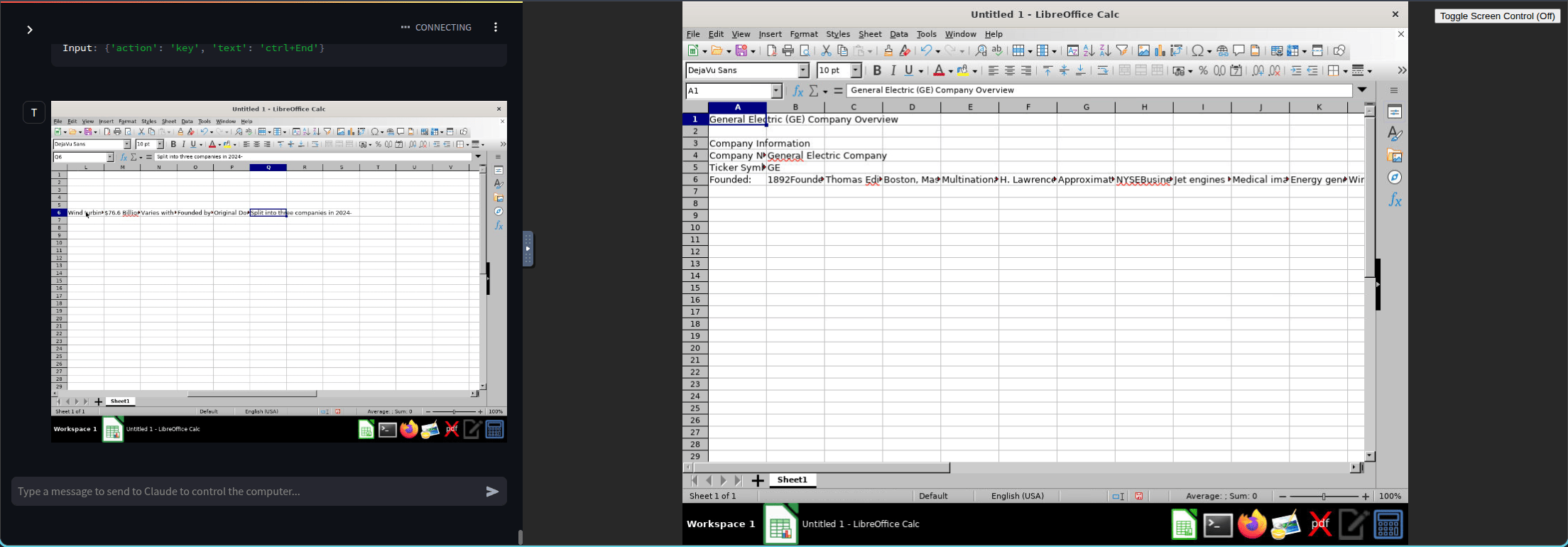
You're not really "asking Claude to do a task." You're working out the steps of a task together. I had it open LibreOffice Calc and fill in some GE company info. Each step showed up on the right while the chat panel showed what it saw and what it decided. It misclicked a couple of times. I corrected it. The instructions got tighter.
When it runs clean, you've got a recipe. And in theory you don't need to watch it anymore -- the same loop could run unattended once you trust it. The UI is where you build the workflow. The workflow itself doesn't need the UI.
Where I see this actually used
The teams I keep running into aren't trying to scale this in a container farm. They have a desktop app -- something their users already run locally -- and they want to add AI to it. The app has to stay on the user's machine. It talks to local hardware, or local files, or an on-prem system, or it's just the tool the user lives in all day. Whatever the reason, "move it to a container and run it headless" isn't on the table.
There's a huge pile of software like that. Old ERP clients. Vertical-market accounting tools. CAD and 3D-modeling packages with decades of UI and no meaningful automation surface. Engineering and simulation apps that still ship as thick Windows clients. The procurement app some VP has used for fifteen years that only ships as a Windows installer. None of that has an MCP server and plenty of it doesn't even have a REST API, and there's no roadmap for either.
The path to adding AI to that world isn't waiting for the vendor. It's an agent running alongside the user, watching the same screen, and taking over the clicks when asked. Call it RPA with a better brain if you want -- the incumbent RPA tools still win on deterministic selectors, audit trails, and governance, but computer-use wins on how fast you can get something running on an app nobody wrote a selector library for. That tradeoff is the reason I see it picking up traction with teams whose product is a desktop app.
What's next for me
- A read-only bind mount of a project folder so the container can see some of my actual code.
- Figuring out where this fits with the rest of my stack. I already have OpenClaw in another container reaching me on Discord. Computer-use could be a tool it invokes, or a separate thing I bring up when I need it.
- Keeping an eye on the Windows-container side, even if I'm not building there. It's the more interesting half of this story.
For everything else I'll keep reaching for a developer tool's CLI, an HTTP API, or Chrome DevTools first. Those are still the right tools for what I do today. That ordering is a current call, not a permanent one -- as computer-use gets faster and cheaper, the "last resort" framing will probably stop making sense. For now, it's the one you pull out when the app refuses to be anything but a screen -- and for a lot of shops, that's most of the apps they have.